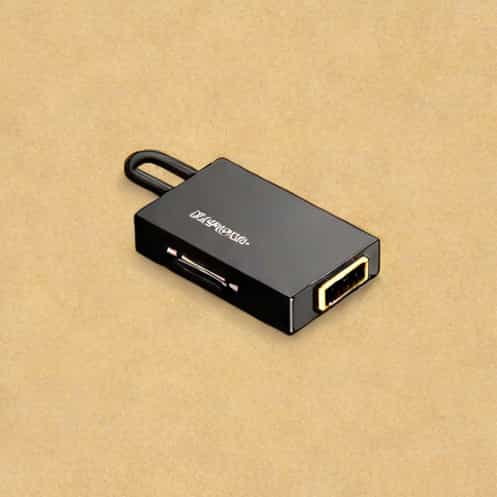
In today’s digital world, the need for versatile connectivity solutions has increased significantly as devices evolve with different standards and ports. One common challenge faced by users is connecting modern devices with HDMI outputs to older monitors or projectors that only support VGA input. Zebronics, a reputable technology brand, addresses this issue with its HDMI to VGA converter. This small yet powerful device enables seamless video transmission from HDMI-enabled devices such as laptops, desktops, gaming consoles, or media players to VGA displays, ensuring that users can continue to use their legacy equipment without compromise.
Understanding the Zebronics HDMI to VGA Converter
The Zebronics HDMI to VGA converter is designed to bridge the gap between HDMI digital output and VGA analog input. HDMI, or High-Definition Multimedia Interface, carries digital signals, while VGA, or Video Graphics Array, is an older analog standard. Directly connecting these two without a converter often results in no display or signal loss. Zebronics’ solution converts the digital HDMI signal into an analog VGA signal efficiently, ensuring clear video quality and reliable performance across different devices.
Key Features of the Converter
- Supports full HD resolution, typically up to 1080p, maintaining visual clarity on VGA monitors.
- Compact and lightweight design, making it highly portable for office, classroom, or home use.
- Plug-and-play functionality, requiring no additional drivers or software installation.
- Durable build with high-quality materials, ensuring long-lasting performance and reliability.
- Compatibility with a wide range of devices including PCs, laptops, gaming consoles, and media players.
Applications and Use Cases
The versatility of the Zebronics HDMI to VGA converter allows it to be used in various scenarios. For professionals working in offices or educational institutions, it provides an effective solution to connect modern laptops to older projectors or monitors during presentations. Home users can enjoy connecting HDMI media players, laptops, or gaming consoles to VGA-only monitors or TVs without investing in new display devices. Its broad compatibility makes it a convenient tool for anyone needing to bridge digital and analog video technologies.
Office and Educational Use
Many offices and schools still rely on VGA projectors and monitors due to budget constraints or existing infrastructure. The Zebronics HDMI to VGA converter ensures that presentations, lectures, or meetings proceed smoothly without technical interruptions. By supporting plug-and-play functionality, users can connect devices quickly, saving valuable time during critical events.
Home Entertainment
For home entertainment enthusiasts, the converter allows connecting modern laptops or media streaming devices to older VGA monitors or televisions. Users can enjoy HD videos, gaming, or multimedia content without upgrading to new displays, making the device both economical and practical.
Technical Specifications
The technical efficiency of the Zebronics HDMI to VGA converter is key to its performance. It typically supports
- Input HDMI type A male connector
- Output VGA 15-pin female connector
- Maximum supported resolution 1920×1080 at 60Hz
- Power USB-powered or via external power adapter, depending on model
- Signal conversion Digital HDMI to analog VGA
Advantages of Using Zebronics HDMI to VGA Converter
The converter offers multiple benefits that make it a preferred choice for users needing digital-to-analog video solutions
- Cost-effectiveEliminates the need to purchase new VGA-compatible displays.
- Easy to useSimple plug-and-play design allows even non-technical users to operate it.
- PortableLightweight and compact, perfect for carrying between home, office, or educational settings.
- Reliable signal conversionMaintains video quality with minimal signal loss or interference.
- Wide device compatibilityWorks with multiple HDMI-enabled devices and VGA displays.
Installation and Setup
Setting up the Zebronics HDMI to VGA converter is straightforward. Users simply connect the HDMI end to their device and the VGA end to the monitor or projector. If additional power is required, a USB cable can be connected to a power source to ensure stable performance. The plug-and-play nature means no drivers or software installation is necessary, and devices typically recognize the connection immediately, displaying content without manual configuration.
Troubleshooting Tips
- Ensure the HDMI device is powered on and set to output video via HDMI.
- Verify that the VGA cable is securely connected to both the converter and the display.
- If the screen does not display content, check if additional power is needed for the converter.
- Restart the source device to refresh the connection if the display remains blank.
- Confirm that the resolution settings of the source device are compatible with the VGA display.
The Zebronics HDMI to VGA converter is an essential tool for users looking to bridge the gap between modern digital devices and older analog displays. By providing reliable digital-to-analog video conversion, it allows seamless connectivity, ensuring users can continue utilizing their existing monitors, projectors, and TVs. Its combination of affordability, portability, ease of use, and broad compatibility makes it a practical solution for offices, schools, and home entertainment setups alike. As technology continues to evolve, devices like the Zebronics HDMI to VGA converter demonstrate the importance of maintaining versatility and ensuring compatibility between different generations of equipment.